How to sign up for online access
Signing up for online access makes it easy to manage your money anytime, anywhere. You can use our website or mobile app to get started. It’s quick and simple! We’re here to help make everything easy…

Signing up for online access makes it easy to manage your money anytime, anywhere. You can use our website or mobile app to get started. It’s quick and simple!
We’re here to help make everything easy. Just follow these steps to get set up.
What you need before you start
Before signing up, get these things ready:
- Your member number
- The email address
- Your mobile number
- Your home address
Steps to sign up
You can sign up on our website or mobile app. Here’s how:
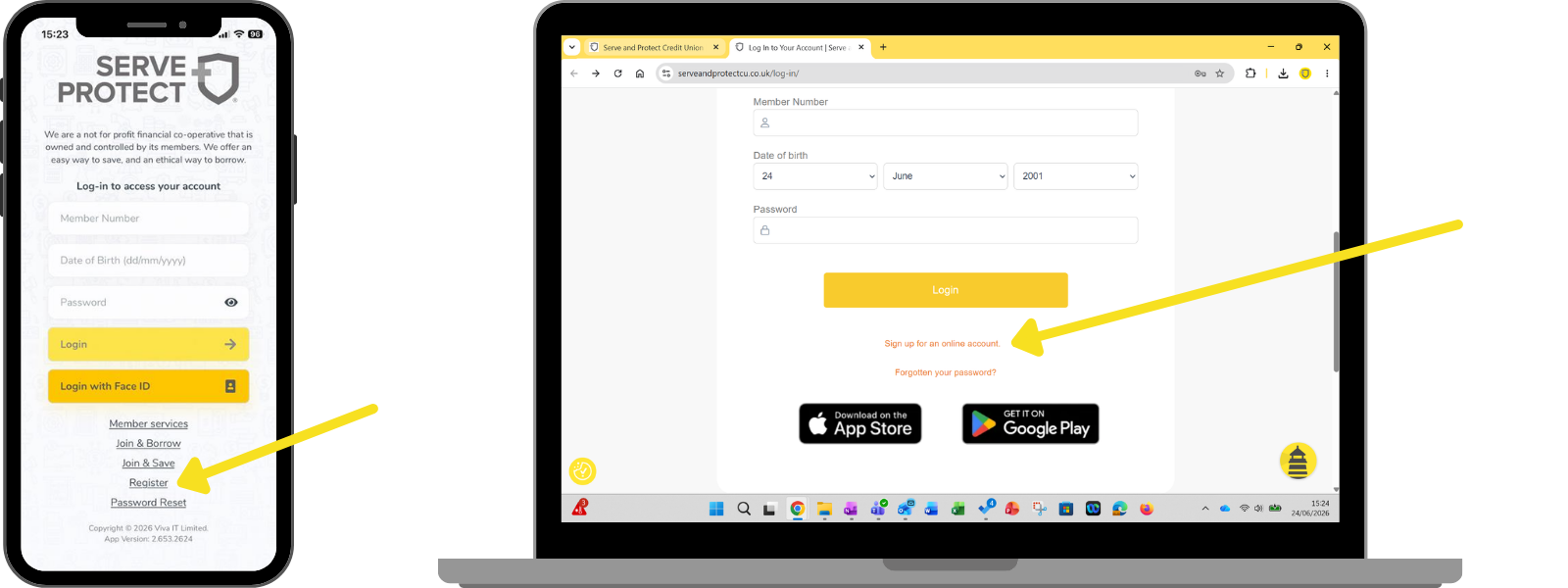
- Find the "Register" button or "Sign up for an online account":
- On the website: Go to our "Log In" area, then look for "Sign up for an online account"
- On the mobile app: Open the app and tap "Register"
- Enter your details:
Type in your Member Number (you can find this in your welcome email) and other personal info.
- Wait for an email:
If your information matches what we have, once you’ve submitted the form, you'll get an email to help you create your password (make sure to check your junk folder).
- Create your password:
Choose a strong password that’s hard for others to guess and helps protect your account.
- You’re all set!
That’s it! Your online access is ready. Log in using the details you just made.
Need help?
If you get stuck or don’t have everything you need, no problem! Just call us, and our friendly team will help you.
How did we do?
Can I log in using a computer?
Why is my app not working?